
The short answer
A Lighthouse SEO score of 100 proves that a page passes ten checks. It says nothing about what happens between your pages. On November 8, 2026, my Next.js portfolio scored 100 on all six page templates I tested, yet 61 of its 89 URLs could not be reached by following links from the home page. To see that kind of problem you have to crawl the whole site, and the script I used is below. The fixes are too recent for me to have traffic data, so I am not claiming any gain.
What I audited, and how
The site is the one you are reading: Next.js 15 with the App Router, static pages, three languages and a few mini-projects, hosted on Vercel. The article on how it is built covers the architecture.
The audit drew on four sources:
- Lighthouse 12.8.2, mobile, on six page templates in production: SEO 100, accessibility 100, best practices 100, performance 99.
- A crawl of the 89 sitemap URLs: HTTP status, metadata, hreflang, structured data and internal links.
- A read-through of the code and the articles, plus a test of the 45 external links they cite.
- The Google and Next.js documentation, to separate real rules from industry habits.
It has three limits:
- It uses neither Search Console nor CrUX field data. It describes the conditions for ranking, not actual positions or traffic.
- "Before" numbers come from production, "after" numbers from a local build of the fixed version.
- I ran the audit and the fixes with an AI agent (Claude Code), then reviewed and approved the result. The mistakes described are genuinely those of my own site.
What Lighthouse actually checks
The Lighthouse SEO category has ten scored audits, and each one looks at a single page:
| Audit | What it verifies |
|---|---|
is-crawlable | Nothing blocks the page from being indexed |
http-status-code | The page answers with a successful status |
document-title | The page has a <title> |
meta-description | The page has a meta description |
link-text | Link text is descriptive |
crawlable-anchors | The <a> tags on the page have a usable href |
robots-txt | robots.txt is valid |
image-alt | Images have an alt attribute |
hreflang | Language codes are valid and URLs are absolute |
canonical | The canonical is valid and free of conflicts |
An eleventh audit, structured-data, is a manual check and does not count toward the score.
The tool is upfront about this. Its SEO category calls these "basic search engine optimization advice" and adds that there are "many additional factors Lighthouse does not score". A page-by-page check cannot answer these questions:
- Does any link lead to this page?
- Do two pages share a title?
- Does the Spanish version point back to the French one?
- Do my internal links lead to pages I excluded from the index?
- Does the code published in my articles still run?
Eight findings, most important first
1. Three islands, one per language
Starting from /, a crawler found the 28 English pages and stopped there. From /fr it found the 35 French pages, and from /es the 26 Spanish pages. Across the whole site, not one <a> tag connected two languages.
The cause comes down to one HTML element: my language switcher was a <button>. For a visitor it worked well, with no page reload. For a crawler it offered no path at all. crawlable-anchors had nothing to report, because it only checks the <a> tags that exist.
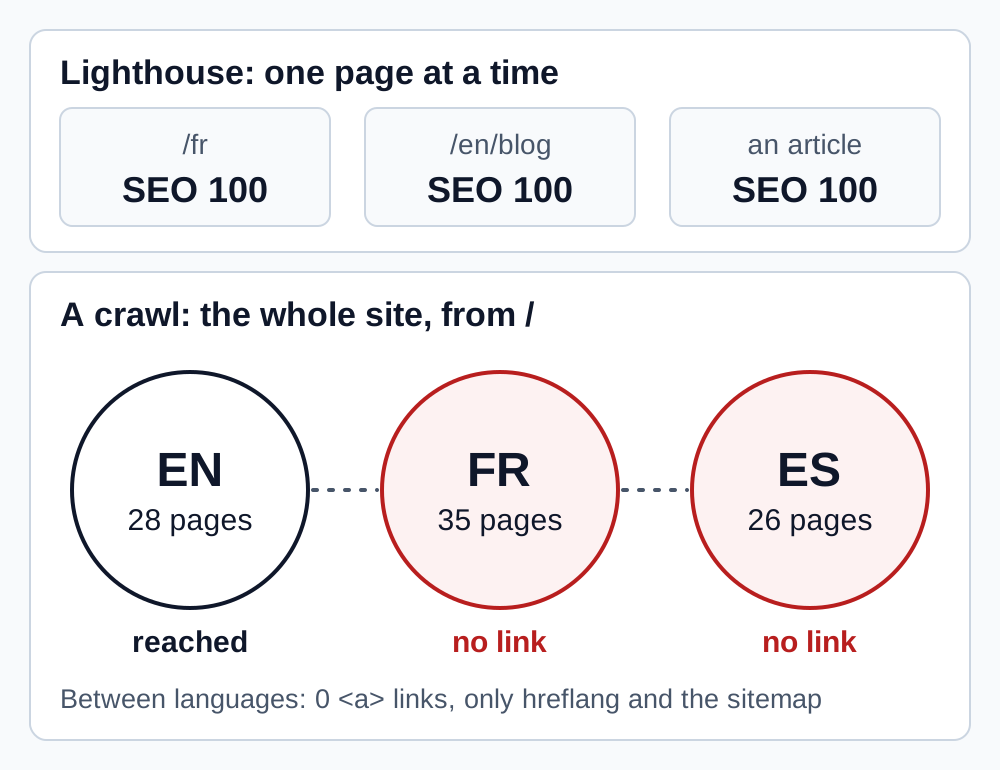
Those pages were not invisible, since the sitemap and hreflang make them discoverable. Without Search Console data I cannot tell you what this cost. Google's advice is still clear: "Consider adding hyperlinks to other language versions of a page." Hreflang declares an equivalence, while a link provides a path, for crawlers and for visitors who land on the wrong language.
The fix keeps the click behavior and adds a real link:
// components/language-provider.tsx
export function LanguageLink({
  locale,
  onNavigate,
  ...props
}: ComponentProps<"a"> & { locale: BlogLanguage; onNavigate?: () => void }) {
  const { changeLanguage } = useLanguage();

  return (
    <a
      {...props}
      hrefLang={locale}
      lang={locale}
      onClick={(event) => {
        // Cmd/Ctrl-click or Shift-click: let the browser open the link as usual
        if (event.metaKey || event.ctrlKey || event.shiftKey || event.altKey) return;
        event.preventDefault();
        onNavigate?.();
        changeLanguage(locale); // the same transition as before, with no reload
      }}
    />
  );
}
Articles need one more step. Their slug changes from one language to another, and the header only learns the translation on the client. So I added a server-rendered line under the title of each translated article: "Also available in Français · Español". It helps readers, and crawlers can follow it.
Hreflang itself was not the problem. In the App Router it goes through alternates, and each version must list itself as well as the others:
export async function generateMetadata(): Promise<Metadata> {
  return {
    alternates: {
      canonical: "https://www.example.com/en/blog/my-article",
      languages: {
        en: "https://www.example.com/en/blog/my-article",
        fr: "https://www.example.com/fr/blog/mon-article",
        es: "https://www.example.com/es/blog/mi-articulo",
        "x-default": "https://www.example.com/en/blog/my-article",
      },
    },
  };
}
2. A site name declared at the wrong address
The name shown above a Google result relies in part on WebSite markup, and the rule is precise: "The WebSite structured data must be on the home page of the site." Google then defines that page: "By home page, we mean the domain or subdomain level root URI." It even adds: "Google Search does not support site names at the subdirectory level."
On all 89 URLs, my markup declared /en, /fr or /es depending on the language: three different sites, none at the root. The JSON-LD was still valid and Lighthouse does not score structured data, so nothing could flag it.
I replaced it with a single entity, identical in every language:
// lib/seo/jsonld.ts
const WEBSITE_ID = `${SITE_URL}/#website`;

export function websiteNode(): Node {
  return {
    "@type": "WebSite",
    "@id": WEBSITE_ID,
    url: `${SITE_URL}/`,
    name: SITE_NAME,
    inLanguage: LOCALES.map((locale) => LOCALE_TO_LANGUAGE_TAG[locale]),
    publisher: { "@id": PERSON_ID },
  };
}
One detail specific to this site: / serves English and its canonical points to /en. Google asks for the same markup on every duplicate: "make sure that you're using the same structured data on all page duplicates, not just on the canonical page." The effect can only be observed after deployment, because Google chooses the name it displays.
3. 61 titles made longer by code you never see
This site has a simple rule: an article's seoTitle stays within 60 characters. The rule was being followed, and yet 61 of the 89 rendered titles exceeded that limit, some reaching 80 characters. The line responsible is in the root layout:
// lib/root-metadata.ts
title: {
  default: `${SITE_NAME} — Full-Stack Developer`,
  template: `%s | ${SITE_NAME}`,
},
title.template adds the brand to every page, and nothing in the page's own code shows it. That is why you should read the rendered titles rather than the ones in your code.
This is not a penalty. Google says "there's no limit on how long a <title> element can be" and that titles are "truncated in Google Search results as needed, typically to fit the device width". The risk is limited to losing the end of the title, so the fix only keeps the brand when it fits:
// lib/seo/metadata.ts
const MAX_TITLE_LENGTH = 60;
const BRAND_SUFFIX = ` | ${SITE_NAME}`;

export function resolveTitle(title: string, absolute = false): Metadata["title"] {
  return absolute || title.length + BRAND_SUFFIX.length > MAX_TITLE_LENGTH
    ? { absolute: title } // skips the layout's template
    : title;
}
The 60-character threshold is this site's convention, not a Google rule.
4. Links to pages I had excluded myself
Eighteen articles on this blog are noindex: trend pieces too generic to deserve a place in the index. Yet 9 links in 7 indexable articles led to 6 of them. Those links answered 200, so no page-level check could flag them.
There is no penalty involved, but the message is contradictory: I ask Google to ignore a page while sending readers of my best articles to it. I replaced those links with an indexable page that serves the point better, or removed them.
This problem comes back with every new article, so I made it a blocking error in the check that runs in CI:
// scripts/check-seo.mjs
} else if (!validPaths.has(pathname) && !publicFile(pathname)) {
  error(file, `broken internal link: ${href}`);
} else if (!fromNoindex && isNoindexArticle(pathname)) {
  error(file, `link to a noindex article: ${href}`);
}
5. Three topic pages for the same content
The French blog had four topic pages. Three of them shared 9 to 10 of their 12 articles, and two received a single internal link. Three addresses for nearly the same list is exactly the kind of page that adds nothing.
I merged two of them into the AI agents page, kept their useful text and added permanent redirects, which Next.js serves as 308:
// next.config.ts
...[
  ...getMergedPageRedirects(),
  ...getMergedTopicHubRedirects(),
  ...getSectionRedirects(),
].map((redirect) => ({ ...redirect, permanent: true })),
Two genuinely distinct topic pages remain, on AI agents and on Next.js.
6. Published code that no longer ran
This is the least flattering finding, and no SEO tool could have made it:
- My LangChain tutorial imported
AgentExecutorandcreate_react_agentfromlangchain.agents, which fails on LangChain 1.x. It also linked to a GitHub repository that returned a 404. - The SmartDAM article called
api-inference.huggingface.co, a host that no longer exists. - The article about this portfolio still described Next.js 13 and a sitemap script that was long gone.
Google asks the question directly: "Does the content have any easily-verified factual errors?" And a developer whose copy-paste fails has little reason to come back.
I rewrote the tutorial for LangChain 1.x and ran every file in a clean Python environment, with a fake model and real SQLite and PostgreSQL databases. Running it found what proofreading had missed:
InMemoryVectorStoreneedsnumpy, which was missing from the install command.- A client created at import time failed before
load_dotenv()had run. - By default,
ModelRetryMiddlewareturns a model failure into an AI message, so the tutorial's API answered 200 while the model was down.
For SmartDAM, I replaced the URL with the Hugging Face router's, without testing it against a real token. A dated note in the article says so.
7. Errors a simple spell checker cannot see
A dictionary pass over the French articles flagged more than 200 occurrences, mostly missing accents. The worst errors were elsewhere: verbs that had wrongly gained an accent, which turns a verb into a different word ("C'est le piégé", "lancé des checks"). Each of those words exists, so a dictionary stays silent. The git history shows where they came from: an old automated pass that added accents introduced them in a single commit.
Google asks: "Does the content have any spelling or stylistic issues?" I fixed them one by one, reading each affected sentence rather than replacing blindly, because many flagged words are correct, especially in Spanish, where "integra" and "publica" are real verb forms.
8. The small inconsistencies
| Finding | Fix |
|---|---|
Apex domain answering 307, temporary, with two hops from http:// | A Vercel dashboard setting, not code |
Six internal links to /, which is not a canonical URL | Direct links to /en |
/fr/projets, /en/projects, /es/proyectos and /fr/blog/themes returning 404 | 308 redirects to the matching list |
| OpsPilot descriptions of 183 and 172 characters, a title with no topic | Title and description written for search, page unchanged |
Sitemap without x-default, although the HTML had it | Added |
llms.txt, ai-profile.json and RSS feeds indexable | X-Robots-Tag: noindex, files still accessible |
| A user-agent branch in the middleware | Removed: the answer depends on Accept-Language, never on the bot |
| A client component importing every landing page for three labels | Labels passed as a prop, blog page JavaScript down from 17.7 to 4.8 KB |
What I measured and left alone
An audit is also there to stop you touching what does not justify it.
inlineCss. This option puts CSS in the HTML, and it stays in the RSC stream as well, which looks wasteful. I compared both settings on a local build, with five runs per variant. FCP gains a stable 50 to 70 ms, and the LCP difference is lost in measurement noise, for 12 KB more on the home page and 48 KB more on an article. The HTML stays far below Googlebot's 2 MB limit. I kept the option.
FAQs. Google has not shown FAQ rich results since May 2026, so adding a FAQ to take up more room in the results no longer does anything. I keep the ones that answer real questions.
llms.txt. For its AI features, Google is explicit: "You don't need to create new machine readable files, AI text files, or markup". I keep this file because it generates itself, and I expect nothing from it.
IndexNow. A manual script notifies Bing and the other participating engines after a deployment. Google does not take part, and I found no evidence of any effect on citations by AI assistants.
The language redirect on /. Google advises against automatic redirects ("Avoid automatically redirecting"). I keep it on the root only: a browser set to French or Spanish is sent to its language, and a crawler, which sends no preference, gets English. Every version keeps its own URL, reachable directly and through a link. It is a deliberate trade-off.
Before and after
The Before column comes from production, the After column from a local build of the fixed version.
| Check | Before | After |
|---|---|---|
| Lighthouse SEO, six page templates | 100 | 100 |
| URLs unreachable from the home page | 61 of 89 | 0 of 90 |
| Titles above 60 characters | 61 | 0 |
| Descriptions outside 70 to 160 characters | 2 | 0 |
Pages declaring WebSite outside the root | 89 | 0 |
| Links to noindex pages | 9 | 0 |
Internal links to / | 6 | 0 |
The score did not move, and that is the whole point: it never saw the difference. This table describes the state of the site, not a search result. Positions and traffic will show up in Search Console, several weeks after deployment.
A script to audit your own Next.js site
Nothing in this script is specific to Next.js: it works on any site with a sitemap. Copy it into a seo-audit.mjs file and run it:
# In production
node seo-audit.mjs https://www.example.com

# On a local build: the script swaps the sitemap's origin for this address
npx next build && npx next start -p 3000
node seo-audit.mjs http://localhost:3000
It reads the sitemap, including a sitemap index, requests each page without running any JavaScript, then applies the rules from this article. The version that runs on this site has a few more, such as HTML weight and click depth.
// seo-audit.mjs: crawls a sitemap and reports what a page-by-page score cannot see.
// node seo-audit.mjs https://www.example.com
// node seo-audit.mjs http://localhost:3000 a local build whose sitemap lists production URLs
// No dependency, Node 20 or later. It reads the HTML the server sends and runs no JavaScript.
const base = (process.argv[2] ?? "http://localhost:3000").replace(/\/$/, "");
const problems = new Map();
const report = (rule, detail) => problems.set(rule, [...(problems.get(rule) ?? []), detail]);
const attr = (tag = "", name) => tag.match(new RegExp(`\\s${name}="([^"]*)"`, "i"))?.[1];
const tags = (html, name) => html.match(new RegExp(`<${name}\\b[^>]*>`, "gi")) ?? [];
const decode = (text = "") =>
text
.replace(/&#x([0-9a-f]+);/gi, (_, hex) => String.fromCodePoint(parseInt(hex, 16)))
.replace(/&#(\d+);/g, (_, code) => String.fromCodePoint(Number(code)))
.replace(/"/g, '"')
.replace(/</g, "<")
.replace(/>/g, ">")
.replace(/&/g, "&");
// The same page must always get the same key: no query, no fragment, no trailing slash
const clean = (url, from) => {
const { origin, pathname } = new URL(decode(url), from);
return origin + pathname.replace(/(?<=.)\/$/, "");
};
const local = (url) => base + new URL(url).pathname;
async function get(url, redirect = "manual") {
const response = await fetch(url, { redirect, headers: { "user-agent": "SeoAudit/1.0" } });
return {
status: response.status,
location: response.headers.get("location"),
robots: response.headers.get("x-robots-tag") ?? "",
html: await response.text(),
};
}
async function readSitemap(url) {
const { html: xml } = await get(url, "follow");
const entries = [...xml.matchAll(/<loc>\s*([^<\s]+)\s*<\/loc>/g)].map((match) => clean(match[1]));
if (!xml.includes("<sitemapindex")) return entries;
return (await Promise.all(entries.map((entry) => readSitemap(local(entry))))).flat();
}
const urls = [...new Set(await readSitemap(`${base}/sitemap.xml`))];
if (urls.length === 0) throw new Error("No URL in the sitemap");
const origin = new URL(urls[0]).origin;
function parse(url, { html, robots }) {
const links = tags(html, "link");
const meta = (name) => attr(tags(html, "meta").find((tag) => attr(tag, "name") === name), "content");
const targets = tags(html, "a").flatMap((tag) => {
try {
const target = clean(attr(tag, "href") ?? "", url);
return target.startsWith(`${origin}/`) || target === origin ? [target] : [];
} catch {
return [];
}
});
return {
title: decode(html.match(/<title\b[^>]*>([\s\S]*?)<\/title>/i)?.[1]),
description: decode(meta("description")),
noindex: /noindex/i.test(`${meta("robots")} ${robots}`),
canonicals: links.filter((tag) => attr(tag, "rel") === "canonical").map((tag) => clean(attr(tag, "href"), url)),
alternates: links.filter((tag) => attr(tag, "hreflang")).map((tag) => clean(attr(tag, "href"), url)),
h1: tags(html, "h1").length,
links: [...new Set(targets)],
};
}
function checkStructuredData(url, html) {
for (const [, json] of html.matchAll(/<script[^>]*ld\+json[^>]*>([\s\S]*?)<\/script>/gi)) {
try {
const nodes = [JSON.parse(json)].flat().flatMap((item) => item["@graph"] ?? [item]);
for (const node of nodes) {
if (node["@type"] === "WebSite" && new URL(node.url).pathname !== "/") {
report("WebSite markup outside the domain root", `${url} (${node.url})`);
}
}
} catch {
report("Invalid JSON-LD", url);
}
}
}
// One page at a time
const pages = new Map();
const seen = new Map();
for (const url of urls) {
const response = await get(local(url));
if (response.status !== 200) {
report("Sitemap URL that does not answer 200", `${url} (${response.status})`);
continue;
}
const page = parse(url, response);
pages.set(url, page);
checkStructuredData(url, response.html);
if (page.noindex) report("noindex page in the sitemap", url);
if (page.canonicals.length !== 1 || page.canonicals[0] !== url) report("Canonical that is not the URL of the page", url);
if (page.h1 !== 1) report("Page without exactly one H1", `${url} (${page.h1})`);
if (page.title.length > 60) report("Title above 60 characters (a risk of truncation, not a penalty)", `${url} (${page.title.length})`);
const length = page.description.length;
if (length > 0 && (length < 70 || length > 160)) report("Description outside 70-160 characters", `${url} (${length})`);
for (const field of ["title", "description"]) {
const key = `${field}:${page[field]}`;
if (!page[field]) report(`Missing tag: ${field}`, url);
else if (seen.has(key)) report(`Duplicate tag: ${field}`, `${url} = ${seen.get(key)}`);
else seen.set(key, url);
}
}
// hreflang: each version names itself, and the versions it names must name it back
for (const [url, page] of pages) {
if (page.alternates.length > 0 && !page.alternates.includes(url)) report("hreflang group without the page itself", url);
for (const other of page.alternates) {
if (!pages.has(other)) report("hreflang target outside the sitemap", `${url} -> ${other}`);
else if (!pages.get(other).alternates.includes(url)) report("hreflang not reciprocal", `${url} -> ${other}`);
}
}
// Internal links: where do they lead?
const answers = new Map();
for (const [url, page] of pages) {
for (const target of page.links.filter((link) => !pages.has(link))) {
if (!answers.has(target)) answers.set(target, await get(local(target)));
const answer = answers.get(target);
if (answer.status >= 400) report("Link to a missing page", `${url} -> ${target} (${answer.status})`);
else if (answer.status >= 300) report("Link to a redirect", `${url} -> ${target} (${answer.status} to ${answer.location})`);
else if (/<html/i.test(answer.html.slice(0, 500))) {
if (parse(target, answer).noindex) report("Link to a noindex page", `${url} -> ${target}`);
else report("Indexable page missing from the sitemap", `${url} -> ${target}`);
}
}
}
// Which pages can a crawler reach by following links from the home page?
const home = parse(`${origin}/`, await get(`${base}/`, "follow"));
const reached = new Set(home.links);
for (const queue = [...reached]; queue.length > 0; ) {
for (const target of pages.get(queue.shift())?.links ?? []) {
if (!reached.has(target)) {
reached.add(target);
queue.push(target);
}
}
}
for (const url of pages.keys()) {
if (!reached.has(url) && url !== `${origin}/`) report("Page no link leads to from the home page", url);
}
for (const [rule, items] of problems) {
console.log(`\n${rule}: ${items.length}`);
for (const item of items.slice(0, 5)) console.log(` ${item}`);
if (items.length > 5) console.log(` ... and ${items.length - 5} more`);
}
const total = [...problems.values()].reduce((sum, items) => sum + items.length, 0);
console.log(`\n${urls.length} URLs, ${total} problems`);
process.exitCode = total > 0 ? 1 : 0;
Here is its output, shortened, on the old version of this site. The "Indexable page missing from the sitemap" rule is pointing at the links to / from finding 8.
WebSite markup outside the domain root: 89
  https://www.mouhssinelakhili.com/en (https://www.mouhssinelakhili.com/en)
  https://www.mouhssinelakhili.com/fr (https://www.mouhssinelakhili.com/fr)
  ...

Title above 60 characters (a risk of truncation, not a penalty): 61
  https://www.mouhssinelakhili.com/fr/developpeur-full-stack-javascript-typescript-paris (67)
  https://www.mouhssinelakhili.com/es/ingeniero-full-stack-paris (64)
  ...

Description outside 70-160 characters: 2
  https://www.mouhssinelakhili.com/fr/projets/opspilot (183)
  https://www.mouhssinelakhili.com/es/proyectos/opspilot (172)

Indexable page missing from the sitemap: 2
  https://www.mouhssinelakhili.com/en/blog/github-copilot-cloud-agent-explained-april-2026 -> https://www.mouhssinelakhili.com/
  https://www.mouhssinelakhili.com/en/blog/agent-command-centers-2026-developer-productivity -> https://www.mouhssinelakhili.com/

Link to a noindex page: 9
  https://www.mouhssinelakhili.com/en/blog/agent-command-centers-2026-developer-productivity -> https://www.mouhssinelakhili.com/en/blog/vibe-coding-field-report-2026
  https://www.mouhssinelakhili.com/en/blog/ai-orchestrator-battle-guide-2026 -> https://www.mouhssinelakhili.com/en/blog/ai-in-2026-autonomous-ai-agents-and-human-ai-collaboration
  ...

Page no link leads to from the home page: 61
  https://www.mouhssinelakhili.com/fr
  https://www.mouhssinelakhili.com/es
  ...

89 URLs, 224 problems
The script exits with code 1 when it finds a problem, so it can also block a CI run. It has limits:
- It only follows links from pages in the sitemap and tests no external link.
- It does not read
robots.txt. - It sees the server's HTML: a client-rendered page will look nearly empty to it, which is useful information in itself.
- The 60 and 70-to-160 character thresholds are guidelines, not Google rules. Adjust them.
- It sends requests one at a time to go easy on your hosting. Only run it on your own sites.
A Next.js SEO checklist
-
Crawl from the home page. Every page in the sitemap must be reachable through links.
-
Find your language switcher in the HTML. It must contain an
<a href>, because a<button>or a<select>provides no path. -
Read your rendered titles, because
title.templatemakes them longer:curl -s https://www.example.com/page | grep -o '<title>[^<]*</title>' -
Check your
WebSitemarkup. Itsurlmust be the domain root, with the same markup on every version of the home page. -
Test your domain redirects. Aim for a single, permanent hop (301 or 308):
curl -sI http://example.com | grep -iE '^(HTTP|location)' curl -sI https://example.com | grep -iE '^(HTTP|location)' -
Check that content arrives without JavaScript. A result of 0 means there is a problem:
curl -s https://www.example.com/page | grep -c "a sentence from the page" -
Reject links to noindex pages in CI. They are the easiest to bring back by accident.
-
Run the code in your tutorials in a clean environment, at least on each major release of the libraries they cite.
-
Measure before you optimize. A setting like
inlineCssis something you compare, not something you guess. -
Check it all against Search Console. Indexed pages and real queries remain the only measure of results.
Frequently asked questions
How do you run an SEO audit on a Next.js site?
Start with the real HTML: every sitemap URL should answer 200 with a correct title, description and canonical. Then crawl the links from the home page, check hreflang reciprocity and run Lighthouse on one example of each page template. Finish with Search Console, the only source for indexing and real queries. The script in this article covers the crawl.
Does a Lighthouse SEO score of 100 guarantee good rankings?
No. It means a page follows ten basic rules, and Lighthouse itself points out that many factors are not scored. Content relevance, the links you earn and the competition for a query are not part of that score.
Is Next.js good for SEO?
Yes, for the parts that depend on the framework: server-rendered HTML, the Metadata API, generated sitemap and robots files. On this site, all content is in the HTML without JavaScript. But Next.js will not connect your pages to each other or write useful content for you. None of the eight findings above is a flaw in the framework.
Do you need links between languages if hreflang is already set up?
Yes, Google recommends it. Hreflang says which version to show to which audience, while a link provides a path for crawlers and for visitors who land on the wrong language. The two do different jobs.
Is a title above 60 characters penalized?
No. Google sets no length limit and truncates the display according to screen width. Sixty characters is a guideline for reducing that risk.
Do you need an llms.txt file to appear in AI answers?
Not for Google: "There are no additional requirements to appear in AI Overviews or AI Mode, nor other special optimizations necessary." For ChatGPT, the point you can verify is not blocking OAI-SearchBot: according to OpenAI, a site that blocks it no longer appears in its search answers.
What to do next
Run the script on your site, even if your score is perfect. Then compare what it finds with Search Console: that is where you will learn what really matters for your pages.
If your site needs this kind of work, my React and Next.js freelance services cover front-end rebuilds, performance and technical SEO. If you are hiring, the Next.js section of my hiring page explains what I bring to a team, and my profile covers my background.
Also worth reading: Next.js SaaS architecture with TypeScript and PostgreSQL and the Next.js developer portfolio SEO checklist.
Sources
- Google Search Central: site names, title links, multi-regional and multilingual sites, localized versions, helpful content, AI features, documentation updates, how Googlebot works
- Next.js: generateMetadata, JSON-LD, inlineCss
- Lighthouse 12.8.2: default configuration, crawlable-anchors audit, hreflang audit
- Other: OpenAI's crawlers, IndexNow, domain redirects on Vercel